账户
发布:2016-05-20
如何新增/删除回复邮箱?
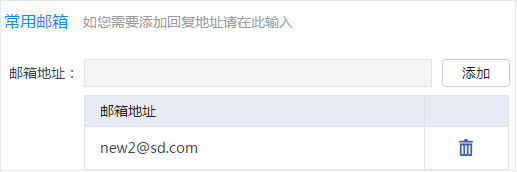
如果您想要新建用于回复的邮箱地址,您需要验证您的邮箱地址。以下为验证步骤:
● 进入【我的帐户】→【我的资料】
● 在这个页面里,可以看到已经通过验证的电子信箱。在文本框内填上想要添加的邮箱地址,点击[添加]发送验证信件。
● 登陆邮箱,可以收到系统发送的附有验证链接的信件,点击验证链接完成添加。
● 点击[删除]可以删除已验证的回复邮箱。
忘记密码该如何找回?
别担心,点击登录页面的"忘记密码",可以通过手机验证找回您的密码。
如何修改密码?
● 进入【我的帐户】→【我的资料】
● 输入当前密码和新密码,点击保存即可完成密码修改。
验证短信无法收到怎么办?
手机验证环节,如果尝试3次手机仍无法获取短信验证信息,请至客服电话:400-8872-888。
可以通过什么方式付款?
目前支持支付宝支付和微信支付。
 邮件营销避免进入垃圾箱技巧分享
 邮件群发营销的技巧
 这些指标都有什么用?
 如何提升邮件阅读率?
 什么样的主题更吸引人?
立即注册
Boss Edm 让邮件营销变得更加方便、快捷、好用!
-

我们致力于企业发送电子广告、产品信息、销售信息、市场调查、市场推广活动信息等,帮助企业监督、快速、低成本进行邮件营销。
-

联系我们
Boss Edm销售专线:
400-8872-888 / 0592-2958885
电子邮箱:
VIP@laobanmail.com - 中资源|老板邮局|H5建站 厦门市中资源网络服务有限公司版权所有 闽B2-20040086